

SlopKiller AI is an AI humanization platform designed to make AI-generated content feel more natural, polished, and human. Instead of leaving you with the predictable wording and patterns often associated with raw AI output, it adds another layer of processing to help refine the content before you publish it.
The platform is built to work across multiple types of digital content, including text, images, audio, videos, AI-created books, articles, and marketing materials. This gives creators, marketers, publishers, and businesses a way to take existing AI-generated assets and give them an additional round of humanization and refinement.
According to the platform’s stated workflow, SlopKiller AI can process AI-generated content in under 30 seconds, allowing you to move from raw AI output to a more polished version without adding hours of manual editing to your workflow.
The basic idea is straightforward: create faster with AI, refine the result with SlopKiller AI, and then publish.
For anyone already relying heavily on AI for content production, this extra step could make the workflow more efficient. Rather than manually rewriting every paragraph, adjusting repetitive phrasing, and trying to remove an obvious AI-style tone yourself, you can use SlopKiller AI as a dedicated refinement layer before the content goes live.
That said, humanization tools should not be viewed as a substitute for genuine editing, fact-checking, originality, or editorial judgment. The quality of the final result still depends on the quality of the original content and how carefully you review the output.
So, the real question is whether SlopKiller AI can actually improve AI-generated content enough to justify adding it to your workflow. That’s what I wanted to find out in my testing.
SlopKiller AI goes beyond basic text rewriting. Its feature set is designed to cover several stages of the content workflow, from humanizing AI-generated writing and checking detection scores to processing images, handling large batches, tracking revisions, and even publishing content.
Here’s a closer look at the main features included with SlopKiller AI.
 AI Text Humanizer
The core of SlopKiller AI is its text humanization engine.
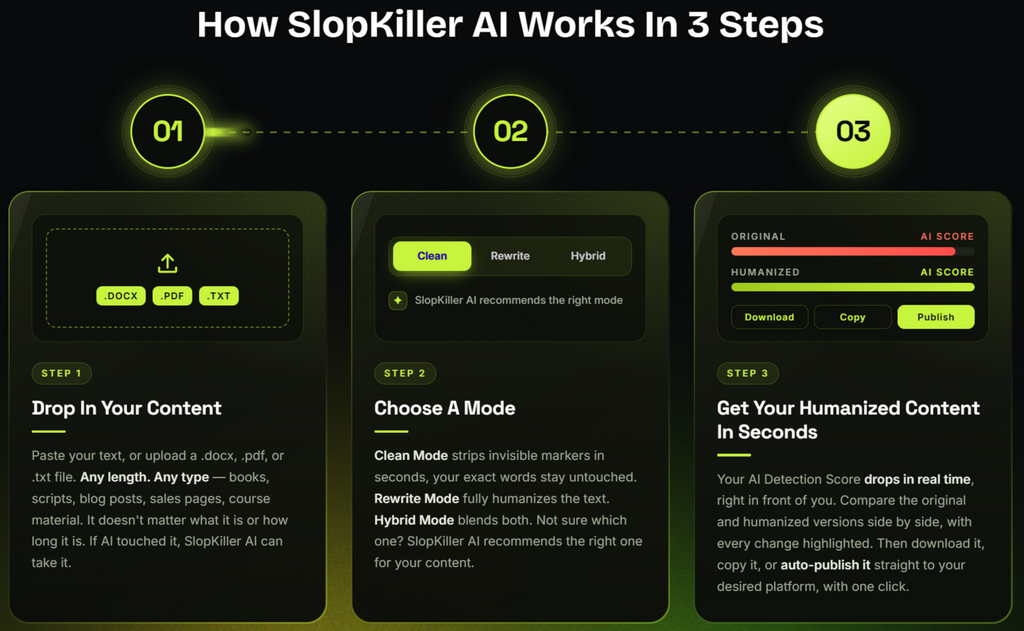
You can paste or upload AI-generated content, and the platform analyzes the wording, sentence patterns, hidden markers, and other characteristics that may make the writing appear machine-generated.
It then processes the content to create a version that is intended to sound more natural while keeping the original message, context, and overall voice intact.
For anyone using AI to produce articles, books, scripts, marketing copy, or other written material, this can provide an additional editing layer before the content reaches readers.
Triple Humanization Mode System
SlopKiller AI gives you three different processing modes, so you can choose how aggressively you want your content changed.
Clean Mode focuses on removing invisible characters and other unwanted elements without substantially changing your original wording.
Rewrite Mode goes further by addressing robotic sentence structures, repetitive language, and other patterns commonly associated with AI-generated writing while attempting to preserve the original meaning and voice.
Hybrid Mode combines the two approaches. It cleans the content first and then rewrites the areas that require additional refinement.
This gives you more control over the final result instead of forcing every piece of content through the same process.
Smart Mode Recommender
Not sure which humanization mode makes sense for your content?
SlopKiller AI includes a Smart Mode Recommender that analyzes your content after you upload or add it to the platform. It evaluates how strongly the content appears to be influenced by AI and then recommends Clean, Rewrite, or Hybrid Mode.
That can save you from repeatedly testing different settings just to figure out where to start.
Unlimited Word Engine
Long-form content can become difficult to manage when a tool forces you to divide everything into small sections.
SlopKiller AI is designed to handle larger documents through its Unlimited Word Engine, allowing you to process substantial content such as manuscripts, courses, long-form scripts, and other large projects in a single workflow.
For writers and publishers working with lengthy documents, this can make the process considerably more convenient.
Unlimited Content
The platform also removes a limit on the number of individual pieces you can process.
Whether you’re working on occasional blog posts or producing content on a much larger scale, you can use the humanization system across books, articles, scripts, sales pages, marketing materials, and other digital content.
This makes the platform more suitable for users who need to process content regularly rather than just testing a humanizer once or twice.
Detection Scanner
Before publishing, you can also analyze how your content may be evaluated by different AI-detection systems.
SlopKiller AI’s Detection Scanner checks content against platforms such as Originality.ai, GPTZero, Copyleaks, Turnitin, and others. It provides individual results and risk scores for each file, giving you more measurable feedback than simply reading the content and deciding whether it “sounds human.”
However, detection scores can vary between tools and over time, so these results are best treated as indicators rather than guarantees of how every detection system will classify your content.
AI Image Humanizer
SlopKiller AI isn’t limited to written content.
Its AI Image Humanizer is designed to process AI-generated images by targeting elements such as generation signatures, EXIF metadata, C2PA markers, and invisible watermarking such as SynthID.
This can be useful if you’re creating covers, thumbnails, advertisements, promotional graphics, or large collections of AI-generated visual assets and want another processing step before using them.
Batch Processor
If you’re dealing with dozens of files, processing everything individually can quickly become tedious.
The Batch Processor is designed to handle 50 or more files in a single run, allowing you to upload multiple pieces of content and let the system process them together.
A dedicated dashboard also allows you to monitor the status of individual files while the batch job is running.
Live Processing Monitor
You don’t have to sit there wondering whether your content is still processing.
SlopKiller AI displays the progress of your project through four stages:
Cleaning → Analyzing → Humanizing → Verifying
A live progress bar and estimated completion time provide additional visibility into the process, making it easier to understand what is happening while your content is being processed.
Detection Score Analyzer
One of the more useful features is the ability to compare detection results before and after humanization.
The Detection Score Analyzer displays the AI detection score side by side, allowing you to see how the content changed after processing.
The product claims that content can potentially move from an AI score above 90% to below 5%. However, actual results can vary depending on the original content, detection system, subject matter, and other factors.
The advantage is that you can look at the reported before-and-after numbers yourself rather than relying entirely on a marketing promise.
Human Feel Score
A low AI-detection score isn’t necessarily enough.
Content can technically appear less AI-like and still feel awkward, unnatural, or difficult to read.
That’s why SlopKiller AI includes a Human Feel Score, which provides another measurement intended to evaluate how naturally the processed content reads.
This gives you two different things to consider: how the content performs against detection tools and how natural the finished version feels to an actual reader.
Word-Level Change Tracker
Another useful feature is the ability to see exactly what changed during the humanization process.
The original and processed versions are displayed side by side, with individual modifications highlighted.
This makes it easier to review the edits, check important wording, and make sure the final version still communicates what you originally intended.
For anyone who doesn’t want a humanizer making unexplained changes throughout an article, this added visibility can be valuable.
Multi-Platform Optimizer
Content created for YouTube isn’t necessarily structured the same way as content prepared for Google, Amazon KDP, academic work, or social media.
SlopKiller AI addresses this with platform-specific optimization profiles for destinations such as Amazon KDP, YouTube, Google SEO, academic papers, and social media.
The idea is to adjust the processing approach based on where you intend to use the content instead of treating every piece of writing as if it has the same publishing requirements.
Auto-Publish Suite
Once your content has been processed, SlopKiller AI can also help shorten the distance between editing and publishing.
The Auto-Publish Suite supports integrations with Amazon KDP, Medium, and WordPress, with features such as scheduled publishing, bulk publishing, and platform-specific formatting.
For publishers managing multiple pieces of content, this could help reduce the number of manual steps between finishing an article and getting it live.
Project History Library
Previously processed projects aren’t simply lost after you finish a session.
SlopKiller AI automatically stores your project history, allowing you to return to older content, review previous results, or process the same material through another humanization mode when you want a different level of refinement.
This can be particularly useful when you’re experimenting with different processing approaches.
Usage Dashboard
The Usage Dashboard gives you a central view of your account activity.
You can see information such as the number of words processed during the month, recent projects, and other relevant usage details.
Instead of searching through different areas of the platform, you can use the dashboard to quickly understand what you’ve already processed and continue from where you left off.
Multi-Format Export Engine
After processing your content, you can export the finished files in several commonly used formats, including DOCX, PDF, and TXT.
This means you can choose the format that fits your existing workflow without necessarily needing another conversion tool before moving the content into your publishing or editing process.
Team Workspace
SlopKiller AI also has features aimed at agencies, publishers, and larger content teams.
The Team Workspace supports up to 10 team members, with role-based permissions designed to help administrators control access.
You can also manage team analytics, centralized billing, and custom branding from a shared workspace.
For teams producing content together, this provides a more organized environment than simply sharing one account login among multiple people.
Full Content Ownership
According to the offer, the content you process remains yours to use and monetize.
The platform does not require an additional commercial-use license for the resulting content under the stated offer terms, allowing you to publish the processed material across supported platforms and retain the revenue it generates.
As always, you should still make sure that your content complies with the rules and publishing requirements of the platform where you intend to use it.
Cloud-Based Access
Because SlopKiller AI operates online, there is no desktop software that you need to download, install, or manually update.
You can log into the platform from an internet-connected laptop, tablet, or phone and access your projects from wherever you’re working.
This cloud-based approach can be especially convenient for users who switch between devices during their content-production workflow.
Lifetime Access With No Monthly Fees
Another major selling point is the pricing structure.
Instead of requiring another recurring monthly software subscription, the offer provides access through a one-time payment, subject to the terms of the specific offer.
For frequent AI-content users, avoiding another monthly bill can make the overall value more attractive, particularly if the platform becomes part of your regular publishing workflow.
30-Day Money-Back Guarantee
Finally, SlopKiller AI comes with a 30-day money-back guarantee.
This gives you a month to test the platform with your own content and determine whether its features and results fit your workflow.
If you decide that it isn’t right for you or doesn’t perform as expected, the offer states that you can request a refund by email within the applicable 30-day period.
Overall, SlopKiller AI combines text humanization, detection analysis, image processing, bulk workflows, revision tracking, exporting, publishing integrations, and team features into one platform. The biggest question isn’t whether it has a long feature list—it does. The more important question is whether those features produce enough practical improvement to justify adding another tool to your AI content workflow.


SlopKiller AI Pricing – Front-End Deal
Right now, SlopKiller AI is available for $17 as a one-time payment.
For that price, you’re getting considerably more than a basic AI rewriting tool. The front-end package is designed to give you a complete starting point for processing and refining AI-generated content, with features such as multiple humanization modes, detection analysis, before-and-after scoring, content comparison, long-form processing, image humanization, and other publishing-focused tools.
If you regularly create articles, scripts, books, marketing materials, or digital products with AI, the one-time pricing can be particularly appealing. Instead of adding another monthly subscription to your software stack, you can add a dedicated humanization and quality-control step to your existing workflow.
There’s also a 30-day money-back guarantee, giving you time to test the platform with your own AI-generated content and decide whether the results justify keeping it.
At the current $17 entry price, SlopKiller AI is worth considering if you’re looking for a dedicated tool to refine AI-generated content before publication.
Discount Code: SLOPMAX30

Use code SLOPMAX30 to get 30% off eligible Front-End and OTO purchases throughout the funnel.
[GET SLopKiller AI + APPLY 30% OFF]
SlopKiller AI OTOs – Upgrade Options Explained
The $17 front-end gets you started, but the SlopKiller AI funnel also includes several optional upgrades.
These OTOs are designed for users who need higher processing capacity, bulk workflows, specialized optimization, team collaboration, publishing tools, ready-made content, or commercial licensing.
You don’t necessarily need every upgrade. The right choice depends on how you plan to use SlopKiller AI.
Discount Code: SLOPMAX30
Use SLOPMAX30 for 30% off eligible FE and OTO purchases.
OTO 1: Unlimited – $97
If you’re planning to process a large amount of content, the Unlimited upgrade is designed to remove the main usage restrictions.
It includes unlimited word humanization, unlimited monthly usage, priority processing, and faster humanization speeds.
This upgrade makes the most sense for users working with books, manuscripts, long-form articles, scripts, or a consistently high volume of AI-generated content.
Instead of worrying about hitting usage limits, you can process content on a much larger scale.
Best for: Heavy AI-content users, publishers, writers, and high-volume creators.
OTO 2: Batch Processor – $67
The Batch Processor is built for users who don’t want to humanize files one at a time.
With this upgrade, you can upload and process up to 50 files at once, then export the finished results together.
That can make a significant difference when you’re dealing with an existing library of articles, scripts, books, or other content that needs to be processed.
Best for: Agencies, publishers, bloggers, and anyone with a large content backlog.
OTO 3: Detection Scanner – $67
The Detection Scanner adds another layer of analysis to your workflow.
It allows you to check your processed content against detection services such as Originality.ai, GPTZero, Copyleaks, Turnitin, and others, giving you measurable results to review before publishing.
Rather than relying solely on your own judgment about whether content sounds natural, you can use the reported scores as an additional reference point.
Keep in mind that AI-detection systems can produce different results, so these scores should be treated as indicators rather than absolute guarantees.
Best for: Users who want additional detection-related feedback before publishing.
OTO 4: Team Workspace – $97
If you’re working with other writers, editors, or content managers, the Team Workspace turns SlopKiller AI into a more collaborative environment.
Team members can have their own logins and assigned roles, allowing different people to participate in the content workflow without sharing a single account.
Writers can process content, editors can review the output, and administrators can keep an eye on the overall workflow from one central workspace.
Best for: Agencies, content teams, publishers, and businesses with multiple users.
OTO 5: Multi-Platform Optimizer – $97
Not all content is created for the same platform.
The Multi-Platform Optimizer provides five dedicated humanization profiles designed for different content destinations, including:
-
KDP books
-
YouTube scripts
-
Social media posts
-
SEO content
-
Academic papers
The advantage is that you can process content according to its intended use instead of applying one generic humanization approach to every project.
Best for: Creators publishing across multiple platforms.
OTO 6: Content Template Library – $67
Sometimes the hardest part of content creation isn’t editing—it’s figuring out how to structure the content in the first place.
The Content Template Library provides 100+ ready-made content structures covering areas such as book chapters, video scripts, blog posts, emails, social media content, and more.
You can choose a structure, add your own ideas or AI-generated material, customize it, and then send the finished content through the SlopKiller AI humanization workflow.
Best for: Beginners and creators who want to speed up the content-planning stage.
OTO 7: AI Image Humanizer – $77
If your content workflow includes AI-generated visuals as well as AI-written text, this upgrade expands SlopKiller AI beyond written content.
The AI Image Humanizer is designed for visual assets such as book covers, thumbnails, social media graphics, and promotional images.
This can be particularly useful for creators who want to manage both sides of an AI-assisted publishing workflow from the same ecosystem.
Best for: Authors, YouTubers, marketers, publishers, and visual-content creators.
OTO 8: KDP Launch Pack – $97
The KDP Launch Pack is specifically aimed at users who want to turn completed manuscripts into more publishing-ready Amazon KDP packages.
The upgrade is designed to handle several steps of the process, including manuscript formatting, front matter, listing copy, matching EPUB creation, and preparation for the upload stage.
Instead of handling each of these tasks separately, the goal is to shorten the distance between finishing your manuscript and preparing it for publication.
Best for: KDP authors and publishers who want a more streamlined publishing workflow.
OTO 9: Done-For-You Content Vault – $97
The Done-For-You Content Vault is aimed at users who don’t want to begin every project with a blank page.
The upgrade includes 500+ ready-to-customize books, 1,000+ article templates, a video script library, ready-to-adapt email sequences, commercial rights, and new content added each month.
Instead of starting every project completely from scratch, you can choose an existing draft, customize it with your own ideas, examples, branding, and voice, and then run the finished content through SlopKiller AI for additional refinement.
For bloggers, KDP publishers, affiliate marketers, YouTubers, agencies, and digital product creators, this can potentially save substantial time during the initial content-development stage.
The important point is that these are starting materials, not a replacement for your own editing and originality. You’ll still want to customize the content and make sure it fits your audience and publishing requirements.
Best for: High-volume publishers and creators who want a large library of starting material.
OTO 10: SlopKiller AI Agency – $197
The Agency upgrade moves SlopKiller AI toward a service-based business model.
With the Agency License, you can use the platform to provide content-humanization services to paying clients.
The offer positions this as an opportunity to create humanization packages, charge clients for your services, and retain the revenue generated from those services.
This makes the upgrade more relevant to freelancers, agencies, and marketers who want to turn the software into part of a client-service offering rather than using it only for their own content.
Best for: Freelancers, agencies, marketers, and service providers.
OTO 11: SlopKiller AI Reseller – $297
The Reseller License is the highest-priced upgrade in the funnel and is aimed at users who want to monetize the software itself.
According to the offer, the license allows you to resell the SlopKiller AI funnel, set your own selling price, collect customer payments through your setup, and keep the revenue generated from your sales.
In other words, this isn’t primarily about getting more features for your personal content workflow. It’s designed for users interested in creating a business around reselling the software.
Best for: Entrepreneurs and marketers looking for a software-reselling opportunity.
Which SlopKiller AI OTOs Are Worth Considering?
You don’t need to purchase every OTO to get value from SlopKiller AI.
If you’re a casual user who only processes a few articles or short pieces of content, the $17 front-end may be enough to get started.
If you process large volumes of content, OTO 1 – Unlimited is the more logical upgrade.
If you’re managing dozens of files at once, OTO 2 – Batch Processor could save considerably more time.
For users who specifically want detection-related analysis, OTO 3 – Detection Scanner is the relevant choice.
Agencies and teams may get more value from OTO 4 – Team Workspace, while multi-platform creators may prefer OTO 5 – Multi-Platform Optimizer.
Authors publishing through KDP may find OTO 8 – KDP Launch Pack more relevant, while creators who need a large library of starting material may prefer OTO 9 – Done-For-You Content Vault.
Finally, OTO 10 and OTO 11 are business-focused upgrades. They’re better suited to people who intend to sell content-humanization services or resell the software rather than simply improve their own content.
My recommendation is to start with the front-end, test SlopKiller AI with your own workflow, and only add an upgrade if you can clearly see yourself using the additional features.
Discount Code: SLOPMAX30
Use SLOPMAX30 to claim 30% off eligible Front-End and OTO purchases in the funnel.